
Hard Drive Not Detected? Here’s What to Do Before Calling a Professional
Few things are more stressful than connecting your hard drive and seeing… nothing.
No drive, no files — just silence.
If you’re facing issues like “hard disk not showing up” or “HDD not recognized”, don’t panic. In many cases, your data is still safe — but your next step is critical.
This guide will help you understand why your hard drive is not detected and what you should (and should not) do before going for professional help.
What Causes a Hard Drive to Stop Being Detected?
There isn’t just one reason. Hard drives can fail in multiple ways:
Power-Related Issues
- Faulty adapter or cable
- Insufficient power supply
- Sudden power cuts
Connection Problems
- Loose USB or SATA cable
- Damaged port
- Faulty enclosure (in external drives)
Logical Errors
- Corrupted file system
- Partition issues
- Virus or malware
Hardware Failure
- PCB (circuit board) damage
- Head crash (clicking sound)
- Motor failure
This is why searches like “hard drive not detected” or “hard disk not showing up” are so common — the problem can be simple or serious.
5 Safe Things You Can Try at Home
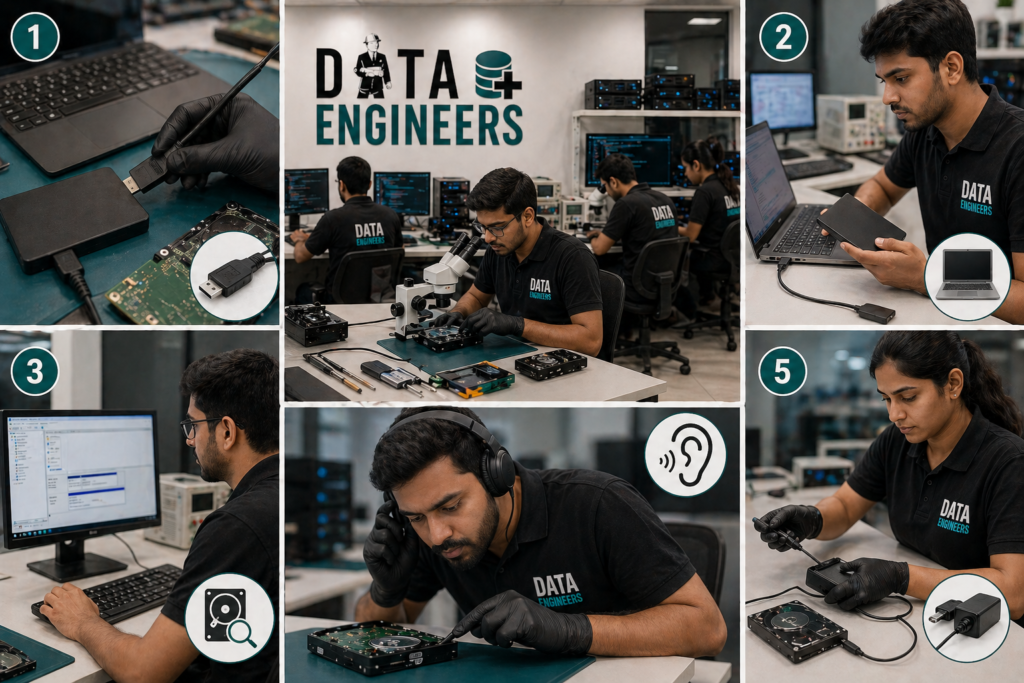
Before assuming the worst, try these safe checks:
1️. Check Cable & Port
Try a different USB cable or connect to another port/system.
👉 Many cases of HDD not recognized are just connection issues.
2️. Try Another Computer
Connect your drive to another PC or laptop.
👉 Helps confirm whether the issue is in the drive or system.
3️. Check Disk Management (Windows)
- Press Win + X → Disk Management
- See if the drive appears without a letter
👉 If visible but inaccessible → likely logical issue.
4️. Listen for Unusual Sounds
- Clicking → head issue
- No sound → power or PCB issue
👉 Sound gives early indication of hardware failure.
5️. Change Power Source (External Drives)
Use a different adapter or power cable.
When DIY Becomes Risky (Most Important Section)
This is where most users make mistakes.
Stop immediately if you notice:
- Clicking or beeping sound
- Drive disconnecting repeatedly
- System hanging when connected
- Burning smell or overheating
Avoid:
- Free recovery software (in serious cases)
- Repeated plugging/unplugging
- Opening the hard drive
👉 These actions can reduce recovery chances permanently.
What You Risk Losing
When a hard drive is not detected and handled incorrectly:
- Personal photos & videos
- Office files & projects
- Business data
- Backup archives
👉 In many cases, data loss happens due to wrong attempts — not the failure itself.
What Professionals Do Differently
A professional data recovery lab works very differently from home attempts.
✔ Advanced Diagnosis
Exact issue identification (firmware, PCB, head damage)
✔ Cleanroom Environment
Used for opening drives safely (dust-free)
✔ Specialized Tools
- Firmware repair tools
- Platter reading equipment
- Data extraction software
✔ Controlled Recovery Process
Ensures maximum data safety
Internal Services (SEO Interlinking)
If your drive is not detected, you may need:
- 👉 Hard Disk Data Recovery
- 👉 External Hard Drive Recovery
- 👉 SSD Data Recovery
(👉 Link these to your actual service pages)
Hard Drive Not Detected? Get Help in Delhi
If you are searching for:
- “hard drive not detected fix near me”
- “HDD not recognized solution Delhi”
- “data recovery service near me”
👉 Visit a professional lab in Nehru Place for proper diagnosis.
Avoid local repair shops that may attempt unsafe fixes.
Leave a Comment