- 23 September, 2026
- Data Engineers
- 0 Comments
- 25 Views
- Blog
RAID 10 Data Recovery: How It Works When a Drive Fails
What Is RAID 10 Data Recovery?
RAID 10 data recovery is the process of recovering information from a RAID 10 array after drive failure, controller problems, accidental deletion, corruption, failed rebuilds or other storage failures.
RAID 10 is popular because it combines disk mirroring and striping. It provides redundancy while also delivering strong read and write performance.
But RAID 10 is not failure-proof.
The most important thing to understand is that RAID 10 does not simply have a fixed rule such as “it can lose two drives.”
Which drives fail matters.
If one drive fails from each separate mirror pair, the array may continue operating. If both drives belonging to the same mirror pair fail, the array can become inaccessible and professional recovery may be required.
How Does RAID 10 Work?
RAID 10, also called RAID 1+0, combines:
- RAID 1 — Mirroring
- RAID 0 — Striping
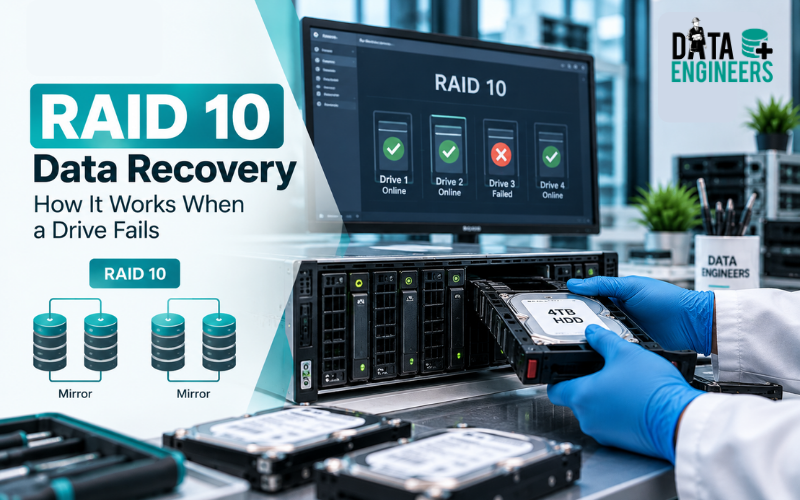
A basic four-drive RAID 10 configuration can be viewed like this:
Drive 1 ↔ Drive 2 = Mirror Pair 1
Drive 3 ↔ Drive 4 = Mirror Pair 2
Data is then striped across the mirror pairs.
This provides both redundancy and performance.
There is no traditional parity calculation like RAID 5 or RAID 6. Instead, the data is protected through mirrored copies. IBM describes RAID 10 as combining block-level striping with mirrored disk pairs.
How Many Drives Can RAID 10 Lose?
This is one of the most common RAID 10 questions.
The answer depends on which drives fail.
One drive fails
The array can generally continue operating because the failed drive has a mirror.
Two drives fail in different mirror pairs
The array may still remain operational because each mirror pair retains one working member.
Two drives fail in the same mirror pair
This is much more serious.
The surviving mirror pairs may still contain useful information, but the array has lost both copies of one part of its mirrored structure.
At this point, the RAID volume may become inaccessible and RAID 10 recovery may be necessary.
So, RAID 10’s fault tolerance is better described as:
It can tolerate multiple drive failures as long as every mirror pair retains at least one usable drive.
What Causes RAID 10 Failure?
A RAID 10 array can fail for many reasons, including:
- Multiple hard drive failures
- SSD failure
- RAID controller failure
- Corrupted RAID metadata
- Power failure
- Failed rebuild
- File-system corruption
- Accidental reconfiguration
- Incorrect drive replacement
- Firmware problems
- Overheating
- Physical damage
- Accidental formatting or deletion
A controller problem can sometimes make healthy RAID drives appear inaccessible even though the data remains on the member disks.
Similarly, a failed rebuild can introduce additional complications.
This is why a failed RAID 10 array should not automatically be treated as a simple bad-drive replacement job.
What Happens When a RAID 10 Drive Fails?
If only one drive in a mirror pair fails, the array may continue running in a degraded condition.
At this stage, administrators often replace the failed drive and allow the RAID controller to rebuild the mirror.
That can be appropriate when:
- The remaining drive is healthy
- The RAID configuration is known
- The controller is functioning correctly
- A verified backup exists
- There are no signs of additional drive failure
The risk appears when the remaining drive is also unstable.
A rebuild puts additional read/write activity on the surviving storage. If another drive from the same mirror pair fails during this process, the situation can become much more serious.
For this reason, current RAID recovery guidance emphasizes assessing the member disks before starting a rebuild.
Should You Rebuild a Failed RAID 10 Array?
Not always.
If the array has simply lost one healthy, replaceable drive, a normal rebuild may be appropriate.
But if:
- Two or more drives are showing errors
- The array has already failed
- A controller has been replaced
- RAID metadata is missing
- Drives are clicking or dropping offline
- A previous rebuild failed
- The array contains critical business data
then immediately starting another rebuild can be risky.
Your first priority should be preserving the existing data.
Data Engineers explains this in its detailed RAID array failure recovery guide, including why blindly rebuilding, formatting or changing drive positions can make recovery more difficult.
RAID 10 Data Recovery Process
Professional RAID 10 data recovery generally starts with diagnosis rather than immediately rebuilding the array.
1. Stop Unnecessary Writes
If the array has failed and the data is important, stop unnecessary activity.
Do not create new partitions, format the volume or continue using a severely degraded array without understanding the condition of the disks.
2. Identify Every Member Drive
The original drive order and physical positions can be important during reconstruction.
Label the drives and document their original slots.
3. Assess Drive Health
Each member should be checked for:
- Read errors
- Bad sectors
- Mechanical problems
- SMART warnings
- Firmware issues
- Intermittent disconnections
If a drive is physically failing, recovery may need to begin at the individual-drive level.
4. Create Images Where Appropriate
For unstable drives, recovery specialists may create sector-level images or clones and work from those copies instead of repeatedly accessing the originals.
This preserves the original condition and allows different reconstruction approaches to be tested.
5. Reconstruct the RAID
The recovery process may involve determining:
- Mirror-pair relationships
- Drive order
- Stripe size
- Offset
- RAID metadata
- File-system structure
The array can then be reconstructed virtually from the available data.
6. Extract and Validate Data
Once the RAID structure is reconstructed, files and folders can be extracted to separate healthy storage.
Important databases, documents, photographs, applications and other business files should then be validated.
What If Both Drives in a Mirror Pair Fail?
This is the situation many people associate with RAID 10 recovery after multiple drive failure.
Recovery may still be possible if useful information can be recovered from the failed members.
For example, one failed HDD may have:
- Bad sectors
- Head damage
- Firmware problems
- PCB problems
- Motor failure
A specialist may first need to recover readable information from that physical drive.
The recovered information can then potentially be combined with the surviving RAID members to reconstruct the virtual array.
Recovery success depends heavily on the condition of the drives and how much data remains readable.
RAID 10 Recovery After Controller Failure
A failed RAID controller does not necessarily mean the data on the disks is gone.
However, replacing the controller and changing configuration settings without documenting the original environment can create additional problems.
The recovery team may need to determine the original RAID parameters before reconstructing the array.
This is particularly important for enterprise environments where RAID is used for:
- Database servers
- VMware environments
- File servers
- NAS systems
- Business applications
- CCTV storage
- Virtual machines
For complex server incidents, see our server data recovery service.
Common RAID 10 Recovery Mistakes
Avoid these actions when the array contains important data:
Do not format the RAID volume
Formatting can overwrite structures needed for recovery.
Do not initialize the array
Initialization can alter important RAID information.
Do not randomly swap drives
The original drive positions can be important.
Do not repeatedly rebuild
A rebuild can place additional stress on already unstable drives.
Do not run repair utilities blindly
File-system repair should not be the first response to an underlying RAID failure.
Do not work only from the controller
If the controller or configuration is the problem, the individual member drives may contain the information required to reconstruct the array.
Seagate also recommends preserving drive positions and avoiding repair utilities when bad drives are suspected.
RAID 10 Recovery for NAS, SAN and Servers
RAID 10 is not limited to desktop storage.
It can be found in:
- Enterprise servers
- NAS systems
- SAN environments
- Database servers
- Virtualization platforms
- Business storage arrays
If the RAID 10 array is part of a NAS or SAN, the recovery process may involve the storage architecture as well as the individual disks.
Data Engineers provides NAS and SAN data recovery for complex enterprise storage failures.
For forensic investigation of damaged arrays, see our damaged RAID forensics service.
How to Prevent RAID 10 Data Loss
RAID should always be treated as redundancy, not a backup.
A strong protection strategy includes:
- Regular verified backups
- RAID health monitoring
- Drive-failure alerts
- UPS protection
- Tested recovery procedures
- Properly documented RAID configuration
- Replacement-drive planning
- Monitoring for unusual disk behavior
A RAID array can protect against certain drive failures, but it cannot protect against every form of data loss.
Accidental deletion, ransomware, controller problems, multiple correlated failures and human error can still affect the data.
Final Takeaway
RAID 10 offers strong performance and redundancy, but it is not immune to failure.
The key point is simple:
- RAID 10 can survive multiple drive failures only when every mirror pair retains at least one usable member.
- If both drives in the same mirror pair fail, the array may become inaccessible and RAID 10 data recovery may be required.
- When the data is important, don’t immediately format, initialize, swap drives randomly or start another rebuild.
- Preserve the original RAID configuration, protect the member drives and diagnose the failure before making changes.
Data Engineers provides professional RAID data recovery in India, including recovery support for failed servers, NAS/SAN systems, HDDs, SSDs and damaged RAID arrays.
If your RAID 10 contains critical business files, databases, virtual machines or other valuable information, the safest first step is to protect the array rather than experiment with it.
Contact Data Engineers for professional RAID data recovery
Explore our complete data recovery services for RAID, server, NAS/SAN, HDD, SSD and other storage failures.
Frequently Asked Questions (FAQs)
Can RAID 10 recover from a failed drive?
Yes. RAID 10 is designed to continue operating after a single drive failure as long as the corresponding mirror still has one usable member.
How many drives can fail in RAID 10?
There is no single fixed number. Multiple drives can fail if no mirror pair loses both members. If both drives in one mirror pair fail, the array can become inaccessible.
Can RAID 10 data be recovered after two drives fail?
Potentially. It depends on whether the two failed drives belong to different mirror pairs and, if they are from the same pair, whether usable data can still be recovered from the failed drives.
Should I rebuild RAID 10 after a drive failure?
A rebuild may be appropriate after a clean single-drive failure when the remaining storage is healthy. If multiple drives are failing or the array is already inaccessible, professional assessment is safer before rebuilding.
Can RAID 10 be recovered after controller failure?
Yes, recovery may be possible if the member drives remain readable and the original RAID configuration can be identified or reconstructed.
Is RAID 10 a backup?
No. RAID provides redundancy and availability, but it is not a replacement for an independent backup.
Can failed RAID 10 drives be recovered?
Sometimes. The result depends on the physical condition of the failed drives, the RAID configuration and whether data has been overwritten or altered.

Worldwide Leader in Data Recovery

Professional Expertise with Long Term Experience
DATA ENGINEERS
011-26426316 | +91-9910132719 | +91-9818567981
support@dataengineers.in
Call us for a free advice.
Specialists at retrieving data from all types of hard drive and phone storage media, today Data Engineers has grown into the India’s largest and most technically capable data recovery company.
Leave a Comment