
- 15 August, 2019
- Data Engineers
- 0 Comments
- 345 Views
- Blog
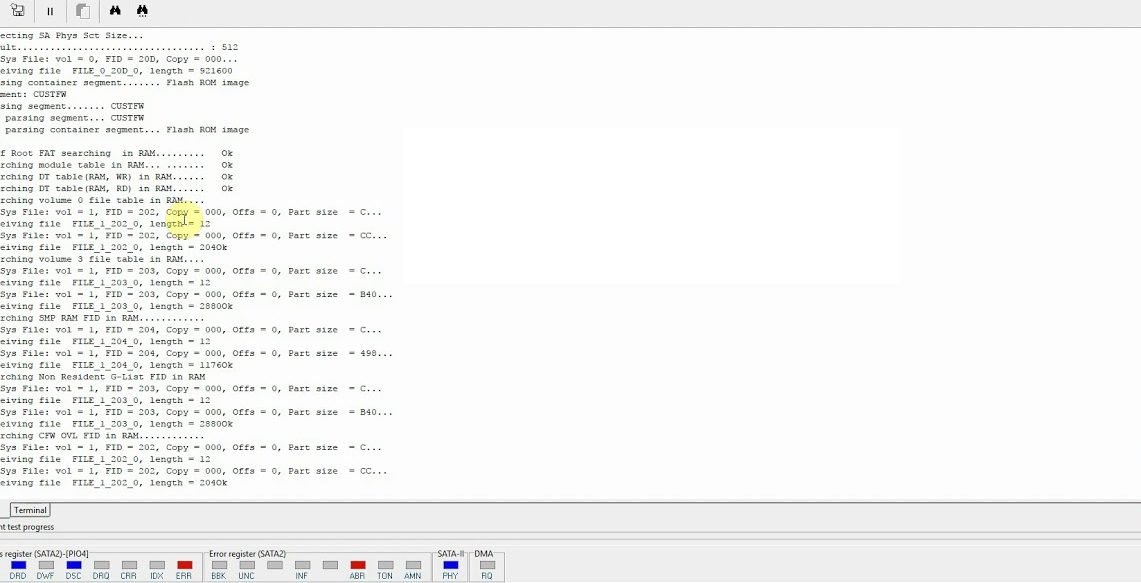
Seagate F3 Terminal Commands for Hard Drive Repair & Recovery
List of Seagate Firmware Level Repair Commands:
These commands are used to repair bad sectors, slow working drive, not able to format, recover data on a hard drive and lot of issue related to logical faults or we can say firmware issue on a seagate hard drive. Please be careful while using these commands, it can also cause hard drive damage if used a wrong command or can cause data loss permanently.
Basic Command List :-
Restore Settings: F3 T> F ,, 22
View SMART: F3 1> N5
Qing SMART: F3 1> N1,, 22
Repair SMART error: F3 1> N0b ,, 22
Qing ALT table: F3 T> i4,1,2
Qing V1 Table: F3 T> i5,1,22
See Table P: F3 T> V10
Clear P Table: F3 1> G6A
View T Table: F3 T> V2
Clear T Table: F3 T> i2,2,22
See Table G-resident: F3 T> V4
Clear G-resident table: F3 T> i4,1,22
Reconstruction LBA Address: F3 1> G6C
Head detection: F3 7> X
Seagate Terminal “m” Command:-
m0,6,2,,,,,22 (most commonly used to regenerate translator)
m0,6,1,,,,,22 (when nothing works, this command will)
m0,2,1,,,,,22 ( To rebuilt slip list, V1 )
m0,2,2,,,,,22 ( To rebuilt G list, V2 )
m0,2,3,,,,,22 ( To rebuilt P list, V3 )
m0,5,1,10,3,,,22 ( To zero fill with slip list )
m0,5,2,10,3,,,22 ( To zero fill with G list )
m0,5,3,10,3,,,22 ( To zero fill with P list )
m0,8,1,10,3,,,22 ( To format with slip list )
m0,8,2,10,3,,,22 ( To format with G list )
m0,8,3,10,3,,,22 ( To format with P list )
m0,D,1,,,,,22 ( To repair bad sector by Slip list )
m0,D,2,,,,,22 ( To repair bad sector by G list )
m0,D,3,,,,,22 ( To repair bad sector by P list )
m0,20,1,,,,,22 ( To format (seacos XF) by Slip list )
m0,20,2,,,,,22 ( To format (seacos XF) by G list )
m0,20,3,,,,,22 ( To format (seacos XF) by P list, most powerfull to repair bad sectors, red and green blocks )
m0,2,2,,,,,22 ( Format user area partition without certifying defects and relocate defects. not effect Data in a drive )
m0,2,1,,,,,22 ( Format user area partition with user slip list with certify defects. DATA WILL BE LOSS )
m0,D,3,,,,,22 ( Format user area partition with repairing of bad sector, auto add bad sector into G list and in the last it will be shifted to P list )
m0,5,1,,,,,22 ( it used for erasing of all sector )
m0,8,2,,,,,22 ( it is used for formatting hard disk sectors )
Terminal Errors with Explanation:-
TCC-001A[0x000042F9][0x000042F9]ZZZZMMMMMMMMMMMMMMMZZZZZZZZZZZZZZZZZZZZZZZZZZZZZZZZZZZZMMMMMMMMMMM…. = This error relates to an inability to read Servo or Overlays. This message is also displayed at some Grenada models when PCB/ROM is not native.
Failed to load overlay 00000004 – this is usually associated with some hardware error and can be caused by non-native adaptives (i.e non-original ROM)
SIM error 1002 = this message alerts us to some error with one or more defect list. Potentially P-list or NRG list can be bad.
SIM error 2044 – Translator tables cannot be read or are damaged.
SIM error 1009 – Module 17A is damaged
SIM Error 203F / SIM Error 2040 / SIM Error 2044 / SIM Error 3005 – Also seem to be damaged or unreadable translator related errors
LED:00000047 FAddr:FFFFFFFE – Usually this relates to Media Cache
LED:000000BC FAddr:00006220 – Usually this also relates to Media Cache or some relocation parameters.
More Terminal Errors Explained:
SIM ERROR 3005 (mean that “format corrupted flag” in on and Translator is not loaded in RAM)
“No HOST FIS-ReadyStatusFlags” (reason message: why translator is not loaded).
More Terminal Errors Collected From the Web
LED:0x000000BD FAddr:0x00009887 or LED:000000BD FAddr:0000988E – Usually relates to Media Cache or other background processes in System File 93. Some have reported clearing SMART as having fixed the issue.
MCMTFileHandler: EXCEPTION: Failed MCMT read request – Relates to System file 346 being damaged, or possibly media cache
LED:000000CC FAddr:0024A7E5 – Bad Translator. Short read channel, clear smart, regenerate translator.
SMI init (or) Training Failed – Bad PCB
Disc FW failed to load – Bad PCB
Sense code = xxxxxx82 – problem with sector translation (broken translator) (x’s will be other numbers)
Sense code = xxxxxx81 – uncorrected error (bad sector, not translator)
LED:00000067 – Normal if PCB is removed from HDA. Otherwise it’s heads/media damage
SimError – Remaining in BootFW
Perform a double download without a power cycle (This error occurs with non-original ROM code or PCB)
Important Note: If replacing cables and using a USB casing doesn’t work and you can’t hear your hard drive spinning, it likely means your hard drive is completely dead. In such cases, use commands for hard drive repair & data recovery like CHKDSK or recovery tools such as Recuva and TestDisk. However, if these commands fail and your data is critical, it’s best to avoid local repair shops. Instead, visit a professional data recovery service provider for expert assistance.
Safety Warning: When NOT to use F3 terminal commands: F3 terminal commands are powerful, low-level instructions that directly manipulate Seagate drive firmware. Incorrect command sequences — especially those modifying translator tables, SA (System Area), or SMART data — can cause permanent, unrecoverable data loss. If your drive contains irreplaceable data, do not attempt F3 terminal repair without professional supervision. Data Engineers’ engineers use F3 commands daily in a controlled lab environment with real-time monitoring to prevent secondary damage.
Frequently Asked Questions
What is the Seagate F3 terminal?
The Seagate F3 terminal is a low-level diagnostic and repair interface built into most Seagate hard drives. It can be accessed via a UART serial connection and allows engineers to run firmware-level commands to repair SA corruption, resolve the ‘BSY’ (busy) bug, fix translator errors, and more.
What is the famous Seagate 'BSY' bug and how is it fixed?
The BSY bug affected certain Seagate 7200.11 firmware drives (2008–2009), causing them to become unresponsive (stuck in ‘busy’ state). The fix involves connecting the drive via UART, powering up without the head stack connected, running specific F3 commands (m0,2,2,0,0,0,0,22 etc.), and reconfiguring the drive’s translator.
Can F3 terminal commands recover data from a clicking Seagate drive?
Clicking indicates physical head damage — F3 commands will not help and may worsen the situation. Physical damage requires clean room head replacement before any software or firmware-level intervention. Data Engineers assesses all clicking drives in a controlled environment first.
Which Seagate models support F3 terminal access?
Most Seagate drives from the Barracuda, Momentus, Pipeline, and SV35 series support F3 terminal access. Models before 2005 and some newer SMR drives may have different interfaces. Data Engineers supports all Seagate generations.
Is it safe to use F3 commands on a drive with important data?
Not without expert supervision. F3 commands can modify low-level firmware structures that, if incorrectly altered, permanently destroy the drive’s ability to locate your data. Always attempt data recovery in read-only mode first and consult a professional before using write-capable commands.
DATA ENGINEERS
011-26426316 | +91-9910132719 | +91-9818567981
support@dataengineers.in
Call us for a free advice.

Worldwide Leader in Data Recovery

Professional Expertise with Long Term Experience
Specialists at retrieving data from all types of hard drive and phone storage media, today Data Engineers has grown into the India’s largest and most technically capable data recovery company.

Leave a Comment