
- 27 July, 2026
- Data Engineers
- 0 Comments
- 174 Views
- Blog
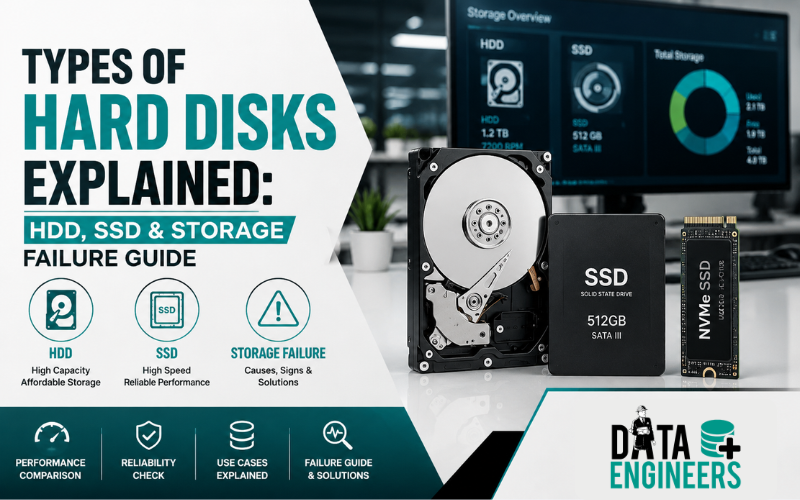
Types of Hard Disks Explained: HDD, SSD & Storage Failure Guide
Choosing the right storage device is more important than ever. Whether you’re buying a new laptop, upgrading your desktop, building a gaming PC or storing important business files, understanding the types of hard disks can help you make the right decision.
Table of Contents
ToggleToday, most computers use either a Hard Disk Drive (HDD) or a Solid State Drive (SSD). While both are designed to store data, they work very differently and have unique advantages, limitations and failure patterns.
Many people compare HDD vs SSD based only on speed. However, factors like reliability, lifespan, storage capacity, cost and data recovery are equally important. Understanding these differences can save you money and help protect valuable data if a drive fails.
In this guide, we’ll explain the different types of hard drives, compare HDDs and SSDs, discuss common SSD failure and HDD failure symptoms and share practical tips to keep your storage devices healthy.
What Is a Hard Disk?
A hard disk is a storage device that saves your operating system, software, photos, videos, documents and other digital files. Unlike RAM, which temporarily stores information while your computer is running, a hard disk keeps your data even after the computer is turned off.
Modern computers mainly use two storage technologies:
- Hard Disk Drive (HDD)
- Solid State Drive (SSD)
Both perform the same basic job but use completely different technology.
Types of Hard Disks
Let’s look at the most common storage devices available today.
1. Hard Disk Drive (HDD)
A Hard Disk Drive is the traditional storage device found in millions of computers.
It stores data on spinning magnetic platters while a mechanical read/write head moves across the surface to access information.
Advantages
- Lower price per GB
- Large storage capacities
- Ideal for backups and media storage
- Good choice for budget systems
Limitations
- Slower than SSDs
- Contains moving parts
- More vulnerable to shocks and drops
- Higher power consumption
HDDs are commonly used in desktops, CCTV systems, external drives, NAS devices and backup servers.
2. SATA SSD
A SATA SSD replaces mechanical parts with NAND flash memory chips.
Since there are no moving parts, it delivers much faster performance than a traditional HDD.
Advantages
- Faster boot times
- Silent operation
- Lower power usage
- Better resistance to vibration
- Lightweight design
Best For
- Office laptops
- Everyday computing
- Students
- Business users
3. NVMe SSD
NVMe (Non-Volatile Memory Express) SSDs connect directly through the PCIe interface instead of SATA.
This allows them to transfer data several times faster than SATA SSDs.
Advantages
- Extremely high read and write speeds
- Faster software loading
- Excellent multitasking
- Ideal for large files
Best For
- Gaming
- Video editing
- Graphic design
- Engineering software
- Professional workloads
4. M.2 SSD
M.2 refers to the physical form factor rather than the storage technology itself.
An M.2 drive may use either:
- SATA
- NVMe
Modern ultrabooks and high-performance laptops commonly use M.2 SSDs because they are compact and efficient.
5. External Hard Drive
External drives connect through USB or Thunderbolt and are commonly used for:
- Backups
- Portable storage
- Photo libraries
- Video archives
They are available in both HDD and SSD versions.
6. External SSD
An External SSD offers the same portability as an external hard drive but with significantly faster transfer speeds.
They are ideal for:
- Creative professionals
- Content creators
- Business users
- Frequent travelers
7. Hybrid Drive (SSHD)
A Solid State Hybrid Drive combines a traditional HDD with a small amount of SSD memory.
Frequently used files are stored in the SSD cache, improving performance while maintaining large storage capacity.
Although less common today, SSHDs are still found in some older laptops.
How Does an HDD Work?
An HDD stores information on magnetic disks called platters.
When you open a file:
- The platters spin at high speed.
- The read/write head moves to the correct location.
- The requested data is read from the magnetic surface.
- The information is sent to your computer.
Because this process involves mechanical movement, HDDs are generally slower and more vulnerable to physical damage than SSDs.
How Does an SSD Work?
An SSD stores information electronically using NAND flash memory chips.
Unlike HDDs, there are no spinning disks or moving heads.
Instead:
- The controller receives requests.
- NAND memory stores data electronically.
- Information is accessed almost instantly.
This design makes SSDs much faster, quieter and more energy-efficient.
HDD vs SSD: What’s the Difference?
Choosing between HDD vs SSD depends on your budget, performance needs and storage requirements.
Feature | HDD | SSD |
Speed | Moderate | Very Fast |
Moving Parts | Yes | No |
Noise | Audible | Silent |
Durability | Lower | Higher |
Power Consumption | Higher | Lower |
Boot Time | Slower | Faster |
Price per GB | Lower | Higher |
Large Storage | Better Value | More Expensive |
If speed and performance are your priority, an SSD is usually the better option. If you need large amounts of storage at a lower cost, an HDD remains a practical choice.
Which Storage Device Is Better?
There is no single “best” storage device for everyone.
Choose an HDD if you:
- Need affordable high-capacity storage.
- Store large collections of photos, videos or backups.
- Want a cost-effective solution for archival data.
Choose an SSD if you:
- Want faster boot times and application loading.
- Use demanding software or games.
- Travel frequently and need better durability.
- Prefer a quieter and more energy-efficient system.
Many users today combine both technologies—an SSD for the operating system and applications and an HDD for storing large files. This setup offers an excellent balance between speed, capacity and cost.
Common HDD Failure Signs
A traditional Hard Disk Drive (HDD) usually gives warning signs before it completely fails. Recognizing these symptoms early can help you back up your files or seek professional help before permanent data loss occurs.
Watch for these common HDD failure symptoms:
- Clicking, grinding or buzzing noises
- Computer becoming unusually slow
- Frequent system freezes or crashes
- Files disappearing or becoming corrupted
- Bad sector warnings
- “Hard Drive Not Detected” error
- SMART failure alerts
- Windows taking a long time to boot
If your HDD starts making clicking sounds, stop using it immediately. Continuing to power on a physically damaged drive can make data recovery much more difficult.
Common SSD Failure Signs
Unlike HDDs, SSDs don’t have moving parts, so they usually fail without making any unusual noises. In many cases, an SSD stops working suddenly.
Common signs of SSD failure include:
- SSD not detected in BIOS
- Computer freezes randomly
- Frequent Blue Screen of Death (BSOD)
- Files become read-only
- Operating system won’t boot
- Random file corruption
- Slow performance despite available storage
- Laptop stuck on the manufacturer logo
Although SSDs are more resistant to physical shocks, they can still fail due to controller issues, firmware corruption, NAND flash wear or unexpected power failures.
HDD Failure vs SSD Failure
Both storage devices can fail, but they usually fail in different ways.
Feature | HDD Failure | SSD Failure |
Moving Parts | Yes | No |
Noise Before Failure | Often | Usually Silent |
Physical Damage | More Common | Less Common |
Sudden Failure | Less Common | More Common |
Mechanical Wear | Yes | No |
NAND Wear | No | Yes |
Recovery Complexity | Moderate | Higher in Some Cases |
An HDD often provides warning signs before failure, while an SSD may stop responding without any noticeable symptoms.
Which Storage Device Lasts Longer?
There isn’t a simple answer because lifespan depends on usage.
HDD Lifespan
Most HDDs last between 3 and 5 years, although many continue working much longer with proper care.
Factors affecting HDD lifespan include:
- Heat
- Physical shocks
- Continuous operation
- Power fluctuations
- Mechanical wear
SSD Lifespan
Modern SSDs generally last 5 to 10 years under normal use. Their lifespan depends on the amount of data written over time, measured as TBW (Terabytes Written).
For everyday users, SSD endurance is rarely a concern, but enterprise environments with constant write operations may wear out SSDs faster.
Can Data Be Recovered from a Failed HDD or SSD?
One of the most common questions users ask is:
“Can I recover my data after a hard drive or SSD fails?”
The answer is yes—in many cases, professional recovery is possible.
HDD Data Recovery
Data recovery from an HDD is often possible if:
- The drive has bad sectors.
- The PCB is damaged.
- Firmware is corrupted.
- The drive isn’t detected.
- The read/write heads are damaged.
However, if the drive is making clicking noises, avoid opening it yourself. Hard drives should only be opened in a professional cleanroom environment to prevent platter contamination.
SSD Data Recovery
Recovering data from an SSD can be more complex because of technologies such as:
- TRIM
- Wear leveling
- Controller encryption
- Firmware management
Recovery may still be possible, but the chances depend on the type of failure and how quickly the drive is handled after the problem occurs.
Tips to Extend the Life of Your Storage Device
Whether you use an HDD or SSD, following a few best practices can help improve performance and reduce the risk of unexpected failure.
- Keep regular backups of important files.
- Use a surge protector or UPS to protect against power fluctuations.
- Avoid dropping or shaking external hard drives.
- Keep your computer cool and well-ventilated.
- Leave free space on SSDs for efficient performance.
- Update SSD firmware when recommended by the manufacturer.
- Monitor drive health using SMART diagnostic tools.
- Shut down your computer properly instead of forcing power-offs.
- Replace aging storage devices before they fail completely.
These simple habits can significantly reduce the chances of data loss.
Why Choose Data Engineers?
If your HDD or SSD has failed, choosing an experienced recovery provider is essential.
Data Engineers has been helping individuals, businesses and government organizations recover valuable data since 2010. Whether your drive has suffered logical corruption or physical damage, our engineers use advanced diagnostic tools and recovery techniques to maximize the chances of success.
We recover data from:
- Internal HDDs
- SATA SSDs
- NVMe SSDs
- M.2 SSDs
- External hard drives
- External SSDs
- RAID arrays
- NAS storage
- Desktop and laptop storage devices
Why Thousands of Customers Trust Data Engineers
- Trusted by 10,000+ satisfied clients
- Class 100 ISO Certified Cleanroom Laboratory
- Over 20 years of combined industry expertise
- ISO 9001 & ISO 27001 Certified
- Up to 98% data recovery success rate
- No Recovery – No Charge policy
- 100% confidential data handling
- PAN India service support
Whether your drive has a firmware issue, bad sectors, SSD controller failure or mechanical damage, our specialists provide professional evaluation and recovery services using industry-leading technology.
Conclusion
Understanding the types of hard disks helps you choose the right storage solution for your needs while also preparing you to recognize early signs of failure. Whether you use a traditional Hard Disk Drive (HDD) or a modern Solid State Drive (SSD), every storage device has its own strengths, limitations and lifespan.
When comparing HDD vs SSD, the best choice depends on how you use your computer. SSDs deliver faster performance and improved durability, while HDDs continue to offer affordable, high-capacity storage for backups and large files.
If you notice signs of SSD failure or HDD failure, avoid repeatedly restarting the computer or attempting risky DIY repairs. Taking the right steps early can greatly improve the chances of recovering your valuable data.
For critical personal or business data, professional diagnosis is often the safest and most effective solution.
Contact Data Engineers
📍 Address:
704, Meghdoot Building-94, Nehru Place, New Delhi
📞 Phone: +91-9818567981
📧 Email: support@dataengineers.in
🌐 Website: www.dataengineers.in
Whether you need help understanding different storage technologies or require professional recovery from a failed HDD or SSD, Data Engineers provides trusted data recovery solutions for individuals, businesses and enterprises across India.
Frequently Asked Questions (FAQs)
What are the main types of hard disks?
The most common storage devices are Hard Disk Drives (HDDs) and Solid State Drives (SSDs). SSDs are further available in SATA, M.2 and NVMe variants, each offering different levels of performance.
What is the difference between HDD and SSD?
An HDD stores data on spinning magnetic platters, while an SSD uses NAND flash memory with no moving parts. SSDs are faster, quieter and more durable, whereas HDDs typically provide larger capacities at a lower cost.
Which is better: HDD or SSD?
It depends on your needs. SSDs offer better speed and responsiveness, making them ideal for operating systems and applications. HDDs are more economical for storing large amounts of data such as backups, videos and archives.
Can SSDs fail suddenly?
Yes. SSDs can fail without warning due to controller issues, firmware corruption, power surges or NAND flash wear. Regular backups are essential to protect your data.
Can data be recovered from a failed SSD?
In many cases, yes. Recovery depends on the cause of the failure, whether TRIM has been executed and the condition of the SSD’s controller and memory chips.
What causes HDD failure?What causes HDD failure?
Common causes include mechanical wear, head crashes, bad sectors, overheating, power surges, PCB damage and accidental physical impact.
How can I tell if my storage drive is failing?
Warning signs include slow performance, frequent crashes, missing files, unusual noises (for HDDs), boot failures or the drive not being detected by the system.

Worldwide Leader in Data Recovery

Professional Expertise with Long Term Experience
DATA ENGINEERS
011-26426316 | +91-9910132719 | +91-9818567981
support@dataengineers.in
Call us for a free advice.
Specialists at retrieving data from all types of hard drive and phone storage media, today Data Engineers has grown into the India’s largest and most technically capable data recovery company.

Leave a Comment