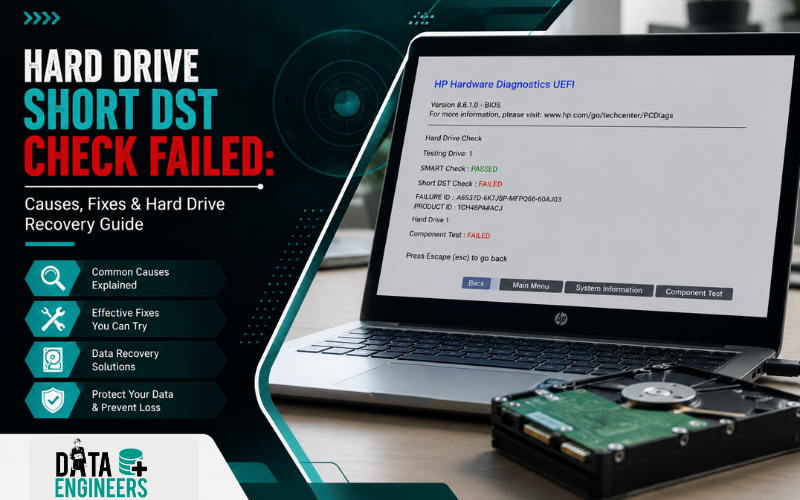
Hard Drive Short DST Check Failed: Causes, Fixes & Hard Drive Recovery Guide
Seeing the Hard Drive Short DST Check Failed error can be worrying, especially if your computer contains important documents, family photos, business files or other valuable data. Many users encounter this message while running HP Hardware Diagnostics or another hard drive diagnostic tool and immediately wonder whether the hard drive has failed.

In many cases, a Short DST Failed result is an early warning that your hard drive is developing problems. However, it doesn’t always mean your data is permanently lost. Understanding what this diagnostic test checks, why it fails and what steps to take next can help you avoid unnecessary data loss.
This guide explains everything you need to know about Hard Drive Short DST Check Failed, including common causes, troubleshooting methods, recovery options and when professional hard drive recovery becomes the safest choice.
What Is Hard Drive Short DST Check?
The Short DST (Drive Self-Test) is a built-in diagnostic test designed to quickly check the health of your hard drive.
Most computer manufacturers include this test within their hardware diagnostics because it can detect common drive problems before complete failure occurs.
During the test, the drive performs several internal checks, including:
- Read and write operations
- Mechanical component health
- Firmware functionality
- SMART status
- Storage surface integrity
- Internal error detection
Unlike a full diagnostic scan, the Short DST only checks critical drive functions and usually completes within a few minutes.
If the test detects serious issues, it reports a Hard Drive Short DST Check Failed or Short DST Failed error.
What Does “Short DST Check Failed” Mean?
A Short DST Failed result indicates that your hard drive did not successfully complete its internal self-test.

This doesn’t necessarily mean the drive has completely stopped working, but it usually indicates that the drive is experiencing hardware or firmware issues that could lead to failure.
Common error messages include:
- Hard Drive Short DST Check Failed
- Short DST Failed
- Hard Drive Diagnostic Error
- HDD Failure
- SMART Hard Drive Error
- Drive Self-Test Failed
These messages should never be ignored because they often appear before a complete hard drive failure.
How Does the Drive Self-Test Work?
Every modern hard drive contains built-in firmware that constantly monitors its own health.
When the Short DST begins, the drive checks several important components.
The process generally follows this sequence:
Power On → BIOS/UEFI → SMART Health Check → Short Drive Self-Test → Test Results
During the test, the hard drive verifies:
- Read/write heads
- Magnetic platters
- Internal firmware
- Motor performance
- Error logs
- Critical SMART attributes
If one or more of these checks fail, the system reports a Short DST Failed error.
Short DST vs Long DST
Many users confuse these two diagnostic tests.
Short DST
- Takes only a few minutes
- Checks critical drive components
- Detects major hardware problems
- Used for quick diagnostics
Long DST
- Can take several hours
- Scans the entire storage surface
- Detects bad sectors
- Performs a more detailed health check
If the Short DST already fails, running repeated Long DST tests is generally not recommended unless your important data has been secured.
Common Causes of Hard Drive Short DST Check Failed
Several different problems can trigger this diagnostic error.
1. Bad Sectors
Bad sectors are damaged areas on the hard drive that can no longer reliably store data.
When these sectors increase, the Short DST may fail because the drive cannot read or write correctly.
2. Mechanical Hard Drive Failure
Traditional hard drives contain moving parts.
Over time, components such as:
- Read/write heads
- Spindle motor
- Magnetic platters
can wear out, causing diagnostic failures.
Common warning signs include:
- Clicking sounds
- Grinding noises
- Slow performance
- Random freezing
- Boot errors
3. Firmware Corruption

The firmware controls how the hard drive communicates with the computer.
Firmware corruption may occur because of:
- Power interruptions
- Manufacturing defects
- Failed firmware updates
- Unexpected shutdowns
A damaged firmware can cause the drive to fail internal diagnostics even if the hardware is still functional.
4. SMART Health Errors
SMART (Self-Monitoring, Analysis and Reporting Technology) continuously tracks the health of your hard drive.
If SMART detects excessive errors, such as:
- Reallocated sectors
- Pending sectors
- Read errors
- Spin-up failures
the drive may fail the Short DST.
5. Physical Shock or Impact
Dropping a laptop or exposing a hard drive to physical impact can damage delicate internal components.
Even if the computer continues working temporarily, the Short DST may later detect hidden mechanical damage.
6. Overheating
Excessive heat can significantly reduce the lifespan of a hard drive.
Long-term overheating may lead to:
- Firmware instability
- Component wear
- Read/write failures
- Mechanical damage
Keeping your system properly cooled helps improve storage reliability.
Signs Your Hard Drive May Be Failing

A Hard Drive Short DST Check Failed message is often accompanied by other warning signs.
Watch for symptoms such as:
- Computer running unusually slow
- Frequent system crashes
- Blue Screen of Death (BSOD)
- Files taking a long time to open
- Clicking or ticking noises from the hard drive
- Missing files or folders
- Windows failing to boot
- Hard drive not detected occasionally
- SMART warning messages
- Random read or write errors
If several of these symptoms occur together, the hard drive may be approaching failure.
How to Fix Hard Drive Short DST Check Failed
The appropriate solution depends on whether the problem is caused by software or physical hardware failure.
Step 1: Back Up Important Data Immediately
If your hard drive is still accessible, your first priority should be backing up important files.
Copy:
- Documents
- Photos
- Videos
- Business files
- Emails
- Financial records
to another storage device or secure cloud storage.
Step 2: Check SMART Status
Many diagnostic tools allow you to view the SMART health of your hard drive.
If multiple SMART attributes show critical warnings, replacing the drive is usually recommended after your data has been safely backed up.
Step 3: Run Manufacturer Diagnostics
Depending on your hard drive or computer manufacturer, you can use official diagnostic tools such as:
- HP Hardware Diagnostics
- Dell SupportAssist
- Seagate SeaTools
- Western Digital Dashboard
- Toshiba Storage Diagnostic Utilities
These tools provide additional information about the drive’s health and can help confirm whether the issue is temporary or indicates a failing drive.
Step 4: Check Drive Connections
For desktop systems and some laptops, inspect the SATA or power connections to ensure the drive is properly connected.
Loose or damaged cables can sometimes cause diagnostic errors or intermittent drive detection.
⚠️ Protect Your Data Before Replacing the Hard Drive
One of the biggest mistakes users make is replacing or formatting the hard drive immediately after seeing a Short DST Failed error.
If the drive contains important files, avoid unnecessary repair attempts until your data has been safely backed up or professionally evaluated.
Repeated testing, formatting or reinstalling Windows on a failing drive can reduce the chances of successful data recovery.
Should You Replace the Hard Drive After a Short DST Failure?

One of the most common questions users ask after seeing a Hard Drive Short DST Check Failed error is whether they should replace the drive immediately.
The answer depends on the severity of the problem.
When Replacement Is Recommended
Replacing the hard drive is usually the safest option if:
- The Short DST test fails repeatedly.
- The drive shows multiple SMART health warnings.
- The hard drive makes clicking, grinding or beeping noises.
- Windows frequently crashes or freezes.
- The drive is no longer detected by the BIOS.
- Bad sectors continue to increase over time.
- The drive is several years old and showing signs of wear.
In these situations, the drive is likely approaching the end of its lifespan. Continuing to use it can increase the risk of permanent data loss.
When Replacement May Not Be Necessary
Sometimes the issue may be caused by:
- Loose SATA or power cables
- Temporary firmware issues
- Incorrect BIOS settings
- Outdated storage drivers
- Diagnostic software glitches
If the drive passes additional manufacturer diagnostics and SMART health appears normal, replacement may not be immediately required. However, it’s still a good idea to maintain a recent backup of your important files.
Can You Recover Data After a Short DST Failure?
Yes. In many cases, data can still be recovered even after a Short DST Failed error.
A failed DST test is a warning that the drive has detected problems. It does not automatically mean your files are gone.
Recovery success depends on factors such as:
- The type of hard drive failure
- Whether the issue is logical or physical
- The condition of the drive’s firmware
- The number of bad sectors
- Whether the drive is still detected by the BIOS
- Whether new data has been written to the drive
If the hard drive is still accessible, back up your important files immediately before attempting further repairs.
If the drive is no longer detected or is making unusual noises, avoid DIY recovery methods and seek professional assistance.
Logical Failure vs Physical Hard Drive Failure

Understanding the difference between these two types of failures can help you choose the right recovery approach.
Logical Failure
A logical failure affects the file system or software but not the physical components of the drive.
Common examples include:
- Corrupted file system
- Windows boot errors
- Deleted partitions
- Virus or malware infections
- Corrupted operating system
- Damaged boot records
In many cases, logical failures can be repaired without replacing the hard drive.
Physical Failure
A physical failure involves damage to the drive’s internal hardware.
Examples include:
- Failed read/write heads
- Scratched platters
- Spindle motor failure
- PCB (Printed Circuit Board) damage
- Firmware chip issues
- Mechanical wear
- Water or fire damage
Physical failures often require specialized equipment and cleanroom facilities to recover data safely.
Common Mistakes to Avoid
Many users unknowingly reduce their chances of successful recovery by making avoidable mistakes.
Continuing to Use the Drive
If the drive is failing, continued use can worsen the damage.
Running Multiple Diagnostic Tests
Repeated Short DST or Long DST tests place additional stress on an already failing drive.
Ignoring SMART Warnings
SMART warnings are early indicators of drive failure. Ignoring them can lead to complete data loss.
Formatting the Drive
Formatting does not repair hardware problems and may overwrite valuable data.
Reinstalling Windows
Installing Windows on a failing drive may overwrite important files and reduce recovery success.
Opening the Hard Drive Yourself
Traditional hard drives contain extremely sensitive internal components.
Opening the drive outside a certified cleanroom can expose the platters to dust and contamination, significantly reducing the chances of successful recovery.
How to Prevent Future Hard Drive Failures

Although no hard drive lasts forever, these best practices can help extend its lifespan and reduce the risk of unexpected failures:
- Regularly back up important data.
- Monitor SMART health using trusted diagnostic tools.
- Keep your computer well-ventilated to prevent overheating.
- Handle laptops carefully to avoid physical shocks.
- Use a UPS to protect against sudden power outages.
- Replace aging hard drives before they fail completely.
- Shut down your computer properly to avoid file system corruption.
- Avoid exposing storage devices to moisture or extreme temperatures.
A proactive maintenance routine is the best defense against unexpected data loss.
Why Choose Data Engineers?
If your hard drive has failed the Short DST Check, protecting your data should be your first priority.
Data Engineers has been helping individuals, businesses and government organizations recover valuable data from failed storage devices since 2010.
Our engineers specialize in recovering data from:
- Hard drives with Short DST failures
- Physically damaged HDDs
- Bad sector drives
- Firmware failures
- Corrupted Windows systems
- Non-booting laptops and desktops
- External hard drives
- RAID and NAS storage
- SSDs
- USB drives and memory cards
Why Thousands of Clients Trust Data Engineers
- Trusted by 10,000+ satisfied customers
- Class 100 ISO-certified cleanroom laboratory
- 20+ years of combined industry expertise
- ISO 9001 & ISO 27001 Certified
- Up to 98% data recovery success rate
- No Recovery – No Charge policy
- 100% confidential and secure recovery process
- PAN India support for personal and business clients
Whether your drive has bad sectors, firmware corruption or physical damage, our specialists use advanced diagnostic and recovery techniques to maximize the chances of recovering your important data.
Conclusion
A Hard Drive Short DST Check Failed error is an important warning that should never be ignored. While the problem may stem from firmware issues, bad sectors or logical errors, it often indicates that your hard drive is beginning to fail.
Before replacing the drive or reinstalling Windows, focus on protecting your important data. Understanding the cause of the failure and taking the right steps early can prevent permanent data loss and unnecessary expense.
If your hard drive contains critical personal or business files and shows signs of physical failure, professional evaluation is the safest way to determine the best recovery approach.
Contact Data Engineers
📍 Address
704, Meghdoot Building-94, Nehru Place, New Delhi
📞 Phone: +91-9818567981
📧 Email: support@dataengineers.in
🌐 Website: www.dataengineers.in
If you’re facing a Hard Drive Short DST Check Failed, Short DST Failed or hard drive diagnostic error, the experts at Data Engineers can diagnose the issue, protect your valuable data and provide reliable recovery solutions for failed hard drives.

Worldwide Leader in Data Recovery


Leave a Comment