
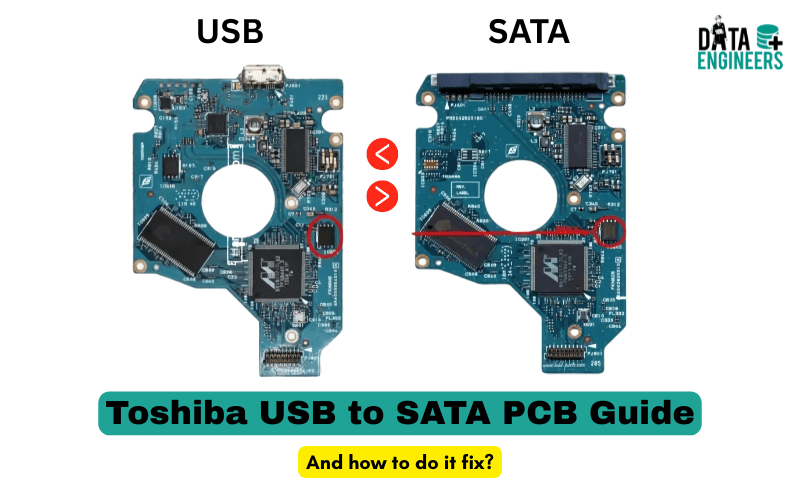
Toshiba External Hard Drive Not Working? USB to SATA PCB Guide
If your Toshiba external hard drive is not working, do not panic. In many cases, the issue is not the hard disk itself. The problem is often the small USB to SATA PCB board inside the enclosure.

This circuit board connects your hard drive to your computer. When it fails, your Toshiba hard drive may not be detected, not spin or show as an unknown device.
This guide explains how to identify hard drive PCB failure, how to test it safely and when to consider professional data recovery service.
What Is a Toshiba USB to SATA PCB?
A USB to SATA PCB (Printed Circuit Board) converts USB signals into SATA signals. It allows your external hard drive to communicate with your computer.
The PCB usually contains:
- USB port
- Controller chip
- Voltage regulators
- SATA interface connector
If this hard drive controller board fails, the drive may stop working even if the internal disk is healthy.
Signs of Toshiba Hard Drive PCB Failure
Your Toshiba external HDD may show these symptoms:

- Toshiba hard drive not detected
- External hard drive not recognized
- Hard drive not spinning
- Toshiba drive not showing up
- Unknown device error
- External drive randomly disconnecting
- Hard drive shows in Disk Management but not accessible
These are common external HDD failure symptoms linked to PCB damage.
Why the USB to SATA Board Fails
Common causes include:
- Power surge or unstable USB power
- Dropping the drive
- Damaged USB port
- Burned controller chip
- Aging electronic components
When this happens, users often search for Toshiba hard drive repair or hard drive PCB repair.
How to Check the PCB (DIY Inspection)
⚠️ Only proceed if you are confident.

Step 1: Visual Inspection
Open the enclosure carefully. Look for:
- Burn marks
- Broken USB port
- Cracked components
- Loose solder points
This helps identify hard drive circuit board damage.
Step 2: Check Power
If you have a multimeter, check for 5V power at the USB input. If power is missing, the board may be dead.
Step 3: Feel for Overheating
Carefully check if the controller chip becomes extremely hot. Overheating is a strong sign of PCB failure.
Step 4: Try a SATA to USB Adapter
Some Toshiba models expose a SATA connector.
If yes:
Remove USB PCB → Connect drive to SATA to USB adapter → Plug into computer.
If it works, you confirmed Toshiba hard drive PCB replacement is needed.
👉 Need the right tools for Toshiba hard drive PCB replacement?
👉 Get them easily from HDD Donor
Common Toshiba PCB Board Numbers
Many Toshiba drives use boards such as:

- G3448A PCB
- G003235A PCB
- G001872D PCB
If replacing, always match the exact Toshiba PCB board number.
Can PCB Replacement Recover Data?
In many cases, yes.
If the internal disk is healthy, replacing a faulty USB to SATA board can restore access. However:
- Some boards require ROM chip transfer
- Some boards have embedded firmware
- Incorrect replacement can cause permanent damage
If data is important, consider professional data recovery.
When to Stop DIY and Seek Professional Help
Stop immediately if:

- The drive makes clicking sounds
- The drive does not spin at all
- PCB replacement does not fix detection
- The data is critical
In these cases, contact a Toshiba hard drive data recovery service or hard drive recovery specialist.
Professional recovery labs can:
- Recover data from dead Toshiba drives
- Repair damaged PCBs
- Handle firmware issues
- Perform secure data recovery
Final Advice
If your Toshiba external hard drive is not working, the USB to SATA PCB may be the issue—not the disk.
But always remember:
- Do not repeatedly power a failing drive
- Do not experiment if data is valuable
- Back up immediately if access returns
When in doubt, choose a professional data recovery service to safely recover data from damaged PCB or external hard drive failure.

Worldwide Leader in Data Recovery

Leave a Comment