• +91-981-856-7981
  • support@dataengineers.in
  • Mon – Sat: 11:00am – 7:00pm
Data Engineers Data Engineers
Call Us
  • Home
  • Services
    • Hard Disk Data Recovery
    • Mobile & Tablet Data Recovery
    • SSD Data Recovery
    • Pen Drive & Memory Card Data Recovery
    • CCTV Footage Data Recovery
    • NAS / SAN Data Recovery
    • Corrupted Files Data Recovery
    • Ransomware Virus Data recovery
    • Server Data Recovery
  • Forensics
    • Drone Forensics
    • RAID Forensics
    • Smartphone Forensics
    • Cryptocurrency Forensics
    • Malware Forensics
    • CCTV Video Footage Forensics
    • Deepfake Forensics
  • Training
  • About Us
  • Blog
  • Contact Us
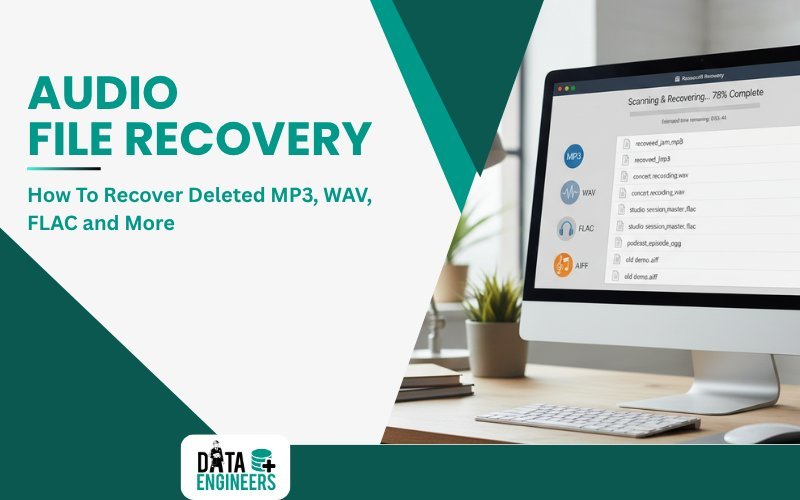
Audio File Recovery How to Recover Deleted MP3, WAV, FLAC and More
  • 8 November, 2025
  • Data Engineers
  • 0 Comments
  • Blog

Audio File Recovery: How to Recover Deleted Audio Files (MP3, WAV, FLAC and More)

Losing your precious MP3, WAV, FLAC and other format audio files accidentally can be one of the most irritating scenarios. However, in today’s digital world, deleted audio file recovery is quite possible, thus saving you from losing your valuable recording, crucial work or favorite music. In this article, we will demonstrate how to recover deleted or lost audio files, from simple tools to professional services, answering all your questions about deleted audio recovery and deleted audio recording recovery.

Table of Contents

Toggle
  • ⚠️ Common Causes of Audio File Loss
  • 🗂 Audio Recovery Methods: How to Recover Deleted Audio Files
    • 1️⃣ Check the Recycle Bin or Trash
    • 2️⃣ Use Audio File Recovery Software
      • Here are some of the best audio recovery software options.
      • Recovery of deleted audio files using recovery software:
    • 3️⃣ Restore from Backup
    • 4️⃣ 🏢 Professional Audio Recovery Services
      • Contact Data Engineers:
  • 🛡 Future Audio File Loss: Ways to Prevent It
  • ✅ Conclusion: Retrieve Deleted Audio Files
  • Frequently Asked Questions?
    • Can deleted MP3 files be recovered after formatting a hard drive?
    • What audio formats can Data Engineers recover?
    • Can audio files be recovered from a water-damaged recorder or phone?
    • My SD card shows 0 bytes — can audio files still be recovered?
    • Worldwide Leader in Data Recovery
    • Professional Expertise with Long Term Experience
  • DATA ENGINEERS

recover deleted audio files

⚠️ Common Causes of Audio File Loss

These are some of the various reasons you might lose audio files from your computer, phone or external drives:

  1. Accidental Deletion: This is one of the most common reasons for audio data loss, whether you have accidentally deleted your recording, song or podcast.
  2. System Crash or Software Glitch: A sudden system crash or malfunction is responsible for corruption or loss of the audio file.
  3. File System Corruption: Problems in your hard drive, memory card or SD card result in documents that are no longer accessible or completely lost.
  4. Formatting: You may have accidentally formatted a drive or device containing your audio recordings.
  5. Physical Damage: Files stored on an external drive, SD card and even smartphones can become corrupt or lost due to physical damage.

Irrespective of the cause, the recovery of audio files is possible. Now, let’s look into the best ways to recover deleted audio recordings and audio files.

🗂 Audio Recovery Methods: How to Recover Deleted Audio Files

recover lost deleted mp3 wav flac audio files from android iphone windows mac sd card usb external hard drive music recovery software free tool www.dataengineers.in

1️⃣ Check the Recycle Bin or Trash

If you’ve deleted an audio file recently, check your Recycle Bin (Windows) or Trash (Mac). Files are often temporarily stored in these areas before they are permanently deleted.

  • Windows: Open the Recycle Bin, locate the deleted audio file, right-click it and select Restore.
  • Mac: Open the Trash, locate your audio file, right click on it and select Put Back.

If your files are not in the Trash or the Recycle Bin, don’t worry; there are still other methods to recover your deleted audio recordings.

2️⃣ Use Audio File Recovery Software

use audio recovery software recover deleted mp3 wav flac songs from sd card usb external hard drive windows mac android iphone disk drill stellar easeus recuva www.dataengineers.in

If the audio files aren’t in the Trash, using audio file recovery software is the next best step. These tools are designed to recover deleted audio files, such as MP3, WAV, FLAC and more, from various storage devices, including hard drives, USB drives, SD cards and external hard drives.

Here are some of the best audio recovery software options.

  • Disk Drill: One of the famous audio recovery tools available, it supports the recovery of files from Mac and Windows systems. It is capable of recovering MP3, WAV and FLAC files from internal and external storage devices.
  • Stellar Data Recovery: This is one of the highest-rated recovery tools, which offers advanced features for audio file recovery. It is capable of recovering lost audio files from damaged or formatted drives.
  • EaseUS Data Recovery Wizard: It is one of the famous software that allows recovering audio files from different media storage. It is capable of recovering MP3, WAV and FLAC.
  • Recuva: It is a Windows free tool which can be used to restore MP3, WAV and other audio files when they are deleted or corrupt.

Recovery of deleted audio files using recovery software:

  1. Install the software on your PC or Mac.
  2. Select the drive or storage device where your deleted audio files were located.
  3. Scanning for missing audio files.
  4. Preview and select the audio files that you want to recover.
  5. Recover the files and save them to a new location to avoid overwriting.

3️⃣ Restore from Backup

restore deleted audio files from backup google drive icloud onedrive sd card external hard drive recover mp3 wav flac recordings android iphone windows mac www.dataengineers.in

You can restore your audio files from backups if you have been backing up your data with cloud storage services like Google Drive, OneDrive or iCloud.

  1. Log into your cloud service: Google Drive, iCloud, etc.
  2. Navigate to the Trash or Deleted files section.
  3. Select the deleted audio file and click Restore or Recover.

If you back up your audio files to an external hard drive or SD card, simply reconnect the device and copy the files back to your main storage.

4️⃣ 🏢 Professional Audio Recovery Services

If your hard drive, SSD or smartphone is physically damaged, normal software might not be able to recover your lost audio files. In such cases, professional help is the best option.

💡 Data Engineers is a trusted company that can recover audio files like MP3, WAV, FLAC and more from damaged devices. They have the right tools and expertise to bring back files from broken or corrupted drives.

Why audio files are harder to recover than documents: Audio files like MP3, WAV, and FLAC use complex container formats that store data in frames and chunks. When a storage device fails mid-write or is formatted, these frames can become scattered across non-contiguous sectors — making standard recovery software ineffective. Data Engineers uses sector-level scanning and proprietary audio file reconstruction algorithms to reassemble fragmented audio files, even from partially overwritten storage media.

Contact Data Engineers:

📍 Address: 704, Meghdoot Building-94, Nehru Place, New Delhi
📞 Phone: +91-11-26426316 | +91-991-013-2719 | +91-981-856-7981
📧 Email: support@dataengineers.in

🛡 Future Audio File Loss: Ways to Prevent It

How to prevent loss of audio files in the future:
prevent audio file loss backup restore mp3 wav flac recordings use drivedx cloud storage google drive icloud external hard drive usb safety tips data protection www.dataengineers.in

  1. Regular Backups: Always back up your audio recordings to an external drive or cloud storage for easy restoration in the event of deletion or corruption.
  2. Beware of Deleted Files: Make sure not to permanently delete any files, especially valuable audio recordings.
  3. Monitor Drive Health: DriveDx is a tool available to keep your drive healthy by monitoring it for problems well in advance to avoid data loss.
  4. Eject External Devices Safely: If you store your audio files on USB drives or external hard drives, ensure that you always safely eject them to prevent corruption.

✅ Conclusion: Retrieve Deleted Audio Files

Losing audio files such as MP3, WAV and FLAC is frustrating; however, it isn’t the end of the world. Whether you have deleted a music file, a podcast or an important audio recording, there are several ways through which you can recover deleted audio. You can start with checking the Recycle Bin or Trash, use audio file recovery software or restore from a backup. When the damage becomes more serious, professional audio recovery services are the best solution.

Regular backup of the essential recordings and files will save the user from data loss in the future. Whether a musician, podcaster or audio professional, good backup will guarantee that whenever disaster strikes, recovery is only a few minutes away and will also save them lots of headaches.

Frequently Asked Questions?

Can deleted MP3 files be recovered after formatting a hard drive?

Yes — formatting does not immediately erase data. It removes file system pointers but leaves the actual audio data on the disk. Data Engineers uses deep-scan recovery to locate and reconstruct MP3, WAV, FLAC, and AAC files from formatted drives, SD cards, and USB drives.

What audio formats can Data Engineers recover?

We recover all major audio formats: MP3, WAV, FLAC, AAC, OGG, WMA, AIFF, M4A, OPUS, AMR, and more. We also recover audio from specialised recording formats used by Zoom recorders, Sony PCM devices, and studio DAW projects.

Can audio files be recovered from a water-damaged recorder or phone?

Often yes. Water damage typically affects the device’s electronics, not the storage chip itself. Data Engineers’ clean room lab can extract the memory chip and recover audio data even from severely water-damaged devices.

My SD card shows 0 bytes — can audio files still be recovered?

A ‘0 bytes’ reading usually indicates a corrupted file system, not physically lost data. In most cases, the audio files are still present on the card and recoverable with professional tools. Do not write any new data to the card before seeking recovery.

worldwide leader data engineers

Worldwide Leader in Data Recovery
Professional Expertise with Long Term Experience

Professional Expertise with Long Term Experience

Data Recovery Professionals

DATA ENGINEERS

704, 7th Floor, Meghdoot Building-94, Nehru Place, New Delhi, India
011-26426316 | +91-9910132719 | +91-9818567981
support@dataengineers.in
Call us for a free advice.

Specialists at retrieving data from all types of hard drive and phone storage media, today Data Engineers has grown into the India’s largest and most technically capable data recovery company.

Get Free Quote
Tags:
Audio Recording RecoveryAudio Recovery ToolsDeleted Audio RecoveryDeleted File RecoveryFLAC RecoveryMP3 File Recovery
Prev PostDigital Forensic Investigator: What They Do, How to Become One, Why It Matters and Career Paths
Next PostMac Data Recovery: Best Methods to Restore Lost Files on macOS

Leave a Comment Cancel Comment

Your email address will not be published. Required fields are marked *

Recent Posts

  • DVR Recovery Guide: How CCTV Recording Recovery Works
  • Black Screen Laptop Recovery: How to Recover Data When Display Fails (2026 Guide)
  • Database Forensics: Complete Guide to Database Forensic Investigation (2026)
  • RAID Array Failed? Here is What NOT to Do – and What Actually Works
  • Recover Deleted WhatsApp Messages, Photos & Contacts (Android & iPhone)

Recent Comments

No comments to show.

Popular Posts

dvr-recovery-guide-cctv-recording-recovery-digital-video-recorder-surveillance-footage-security-camera-dataengineers-in
25 July, 2026 / Blog
DVR Recovery Guide: How CCTV Recording Recovery Works
Black Screen Laptop Recovery How to Recover Data When Display Fails (2026 Guide) www.dataengineers.in
24 July, 2026 / Blog
Black Screen Laptop Recovery: How to Recover Data When Display Fails (
Database Forensics Complete Guide to Database Forensic Investigation (2026)
18 July, 2026 / Blog
Database Forensics: Complete Guide to Database Forensic Investigation

Tags

1Password Vault Recovery Bast Hard Drive 2026 Dashlane Password Recovery Data Recovery Data Recovery Near ME data recovery services Data recovery software Data Recovery Solutions Data Recovery Tips DBX password recovery Deleted File Recovery Deleted Files Recovery Digital Forensics donor matching guide Drone Forensics email database recovery Emergency Data Recovery Encrypted Vault Unlock Enpass Recovery External Hard Drive Recovery FileMaker Pro Recovery forensic vault recovery Hard Disk Recovery Hard Drive Data Recovery hard drive data recovery tips Hard Drive Recovery Hard Drive Recovery Near Me Hard Drive Repair HDD Recovery iPhone Passcode Bypass Laptop Data Recovery LastPass Password Unlock memory card data recovery Mobile Forensics MSG password recovery OST password unlock Outlook email recovery Password Managers Recovery Password Unlock phone data recovery Professional password Recovery Recover Deleted Data SATA To USB Adapter SSD data recovery Thunderbird mail unlock

Categories

  • Blog

With Data Engineers, you can be assured of a seamless experience for data recovery services that are quick, easy and confidential with top-quality results.

    Our Services

    • Hard Disk Data Recovery
    • Mobile & Tablet Data Recovery
    • SSD Data Recovery
    • Pen Drive & Memory Card Data Recovery
    • CCTV Footage Data Recovery
    • NAS / SAN Data Recovery
    • Server Data Recovery

    Forensics Services

    • Damage Drone Forensics
    • Damaged RAID Forensics
    • Smartphone Forensics
    • Deepfake Forensics Investigation
    • CCTV Forensics Data Recovery
    • Malware Forensics Investigation
    • Cryptocurrency Forensics Investigation

    Useful Links

    • Home
    • Services
    • Training
    • FAQ
    • About Us
    • Contact Us
    • Privacy Policy
    • Terms & Conditions

    Locations: Mumbai | Delhi | Bengaluru | Chennai | Kolkata | Hyderabad | Pune | Ahmedabad | Surat | Jaipur | Lucknow | Kanpur | Nagpur | Indore | Thane | Coimbatore | Visakhapatnam | Bhopal | Patna | Vadodara | Ludhiana | Agra | Nashik | Madurai | Chandigarh |

    support@dataengineers.in Drop Us a Line
    +91-981-856-7981 Call Us Now
    704, Meghdoot Building-94, Nehru Place, New Delhi, India Get Direction
    Copyright 2026 Data Engineers, All rights reserved.
    Manage Consent
    To provide the best experiences, we use technologies like cookies to store and/or access device information. Consenting to these technologies will allow us to process data such as browsing behavior or unique IDs on this site. Not consenting or withdrawing consent, may adversely affect certain features and functions.
    Functional Always active
    The technical storage or access is strictly necessary for the legitimate purpose of enabling the use of a specific service explicitly requested by the subscriber or user, or for the sole purpose of carrying out the transmission of a communication over an electronic communications network.
    Preferences
    The technical storage or access is necessary for the legitimate purpose of storing preferences that are not requested by the subscriber or user.
    Statistics
    The technical storage or access that is used exclusively for statistical purposes. The technical storage or access that is used exclusively for anonymous statistical purposes. Without a subpoena, voluntary compliance on the part of your Internet Service Provider, or additional records from a third party, information stored or retrieved for this purpose alone cannot usually be used to identify you.
    Marketing
    The technical storage or access is required to create user profiles to send advertising, or to track the user on a website or across several websites for similar marketing purposes.
    • Manage options
    • Manage services
    • Manage {vendor_count} vendors
    • Read more about these purposes
    View preferences
    • {title}
    • {title}
    • {title}